
Text to speech on Linux, A.I. rising
A.I. for speech synthesis is the next generation of Text To Speech (TTS) software. A.I. systems offer more natural sounding voices, but can sometimes be less accurate. They also can't always change their reading speed and often require more compute than traditional software.


A.I. for speech synthesis is the next generation of Text To Speech (TTS) Software. In my last article I outlined how to set up a range of TTS systems to read back any text anywhere on your Linux system using keyboard commands and your choice of a TTS system and voice.
A.I. systems offer much more natural sounding voices, but can sometimes be less accurate depending on a range of factors. They also can’t change their reading speed (exception Mimic3 and Larynx) and often require much more compute to output the same amount of text as traditional software.
I tried the following projects when looking at A.I. for Linux TTS:
- Mozilla TTS
- Coqui TTS
- Larynx TTS
- Mimic3 TTS
I was only able to get Coqui TTS and Mimic3 to run on my system. Coqui was too slow and required too much system resources for my real-time use case. So I will focus on Mimic3 for this setup.
Below shows how I integrate Mimic3 TTS into my system for everyday use on a Linux desktop. Recommended for users with more powerful systems only as these TTS systems can use up a lot of resources.
For mimic3 there are compiled binaries for Debian based systems you can install from here. I did try when the source install was not working to use debtap to make them work on Arch. They worked to a point but the --interactive flag gave errors so I removed it and gave up on that approach.
I’m on Arch, I originally was unable to install mimic3 over the last few months due to some python packages requiring older versions of python. See here. But now the installation process is working well and it goes like this:
git clone https://github.com/mycroftAI/mimic3.git
cd mimic3
./install.sh
(being in China this did not work so I had to run the git command and the ./install.sh command prefixed by running the proxychains utility).
A video about installing Mimic3 can be found here.
----
mimic3 --voices
After installing mimic you can set it to read any highlighted text like this, together with a custom keyboard shortcut:
<PATH TO WHERE YOU INSTALLED MIMIC3>/mimic3/.venv/bin/mimic3 --voice en_US/vctk_low --interactive "$(xclip -selection primary -out)"
To stop mimic3 use this command:
pkill mimic3
Flags:
- --voice flag sets the voice you want mimic3 to use.
--interactiveflag sets mimic3 to send the audio directly so you hear it on your system, instead of saving the audio to a file.--cudaflag can be added if you want to use mimic3 with your graphics card for better performance.--noise-scale&--noise-wDetermine the speaker volatility during synthesis, 0-1, default is 0.667 and 0.8 respectively--length-scalemakes the voice speak slower (> 1) or faster (< 1)
Mimic3 documentation can be found here. Mimic3 GitHub can be found here. In the documentation it also explains how to get Mimic3 to work with Speech Dispatcher. I have not tried this, it seems easier to just directly integrate it into KDE or GNOME.
View a list of available mimic3 voices here. There is some troubleshooting documentation here.
Now you have everything working and set up you can integrate this with GNOME or KDE. Create a custom shortcut for two hot key commands, one to start and one to stop mimic3.
KDE example: Adding a bash command to a custom keyboard shortcut
/home/eben/mimic3/.venv/bin/mimic3 --voice en_US/vctk_low --interactive "$(xclip -selection primary -out)"

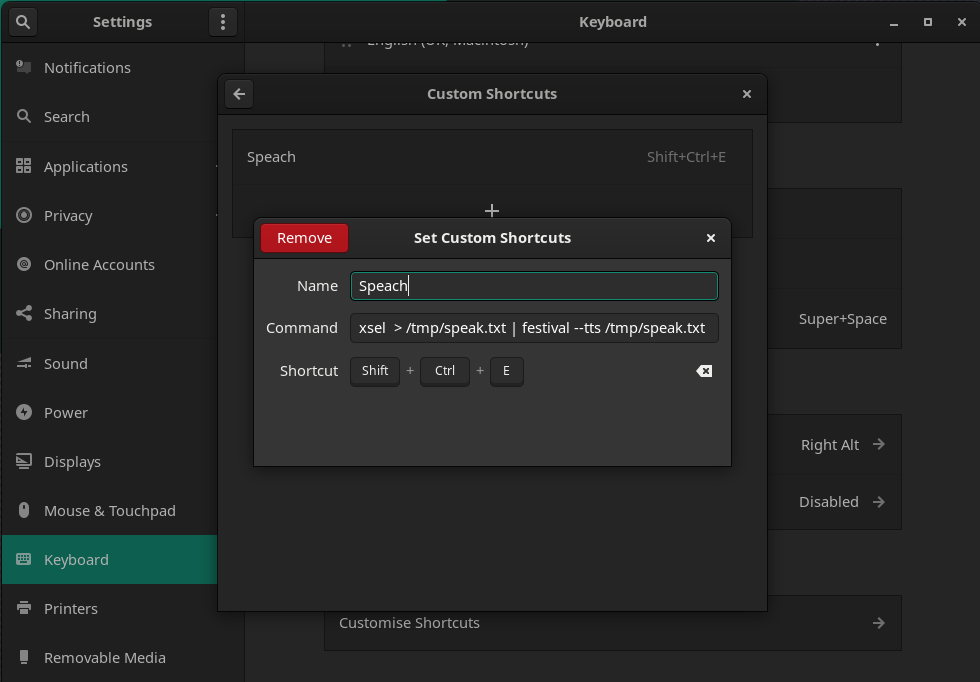
Gnome example: Adding a bash command to a custom keyboard shortcut
Open System Settings then go to: Keyboard » Customise Shortcuts » Custom Shortcuts » +:
Notes and links to other A.I. projects:
Mozilla TTS
https://github.com/mozilla/TTS
(Could not install, seems like this is not maintained)
Coqui TTS
https://github.com/coqui-ai/TTS
(Could install but uses too much system resources)
Larynx TTS
https://github.com/rhasspy/larynx
https://www.reddit.com/r/Fedora/comments/l8bd4y/is_there_a_good_text_to_speech_software_for_linux/
I found Larynx from this reddit post and spent some time trying to get it to run on my system, as it seemed to offer a good set of performance and features. But I could not install, seems some of its dependencies are too old and out of date. It also seems not to be maintained any more.
https://github.com/rhasspy/larynx/issues/51
$ larynx -v en "$(xclip -selection primary -out)"
A nice code snippet to get larynx to read any selected text system-wide.
“I have a version of Larynx working with speech-dispatcher”
https://github.com/rhasspy/larynx/issues/28
TTS script